1. kubelet如何使用容器运行时 在早期 rkt 和 docker 争霸时,kubelet 中需要维护两坨代码分别来适配 docker 和 rkt ,这使得 kubelet 每次发布新功能都需要考虑对运行时组件的适配问题,严重拖慢了新版本发布速度。
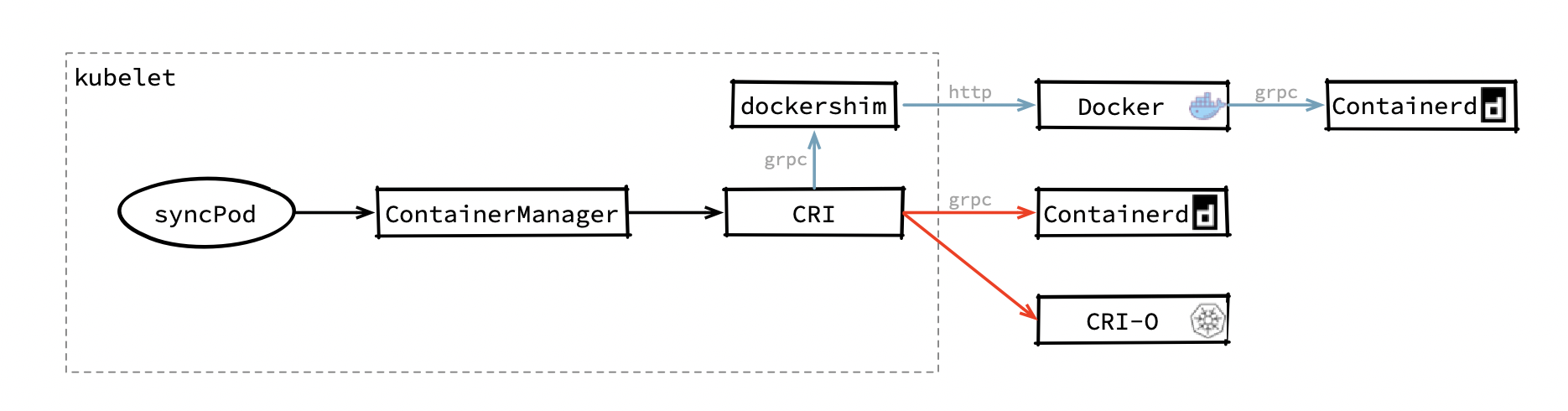
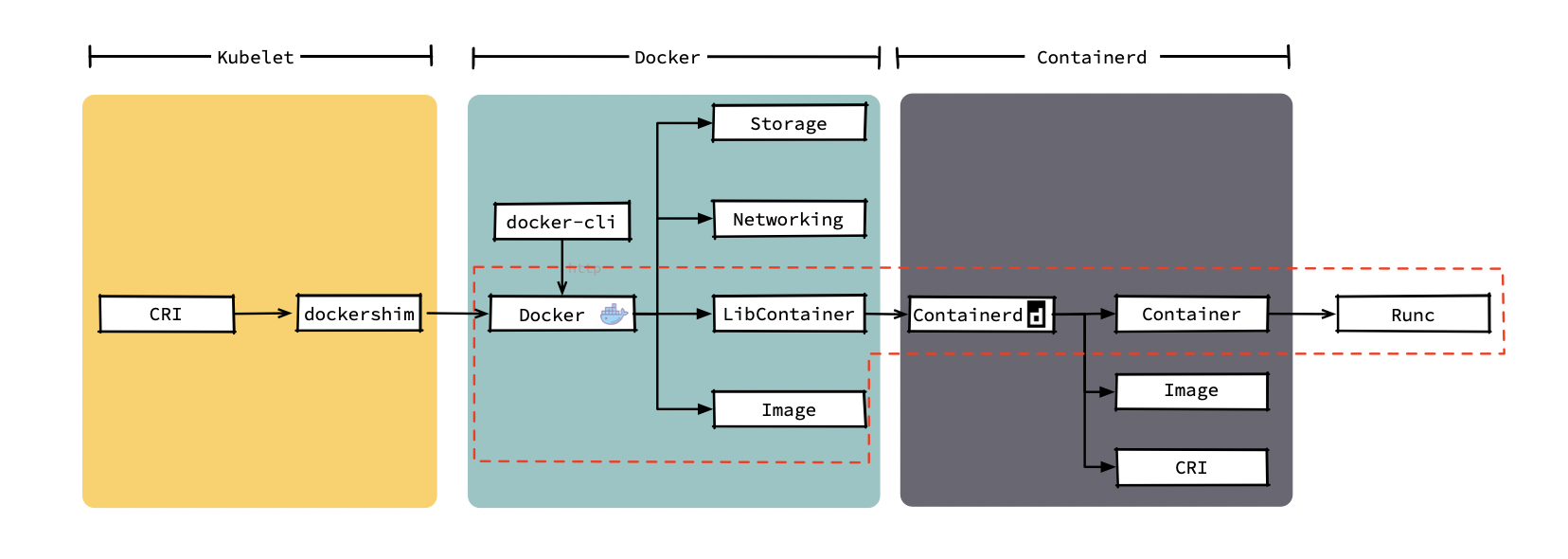
容器运行时可能未来越来越多,如果出现新的运行时,kubelet可能还需要适配新的运行时。于是2016年,k8s提出来容器运行时接口CRI(container Runtime Interface)。CRI是对容器操作的一组抽象,只要容器运行时实现了这个接口,kubelet就能通过这个接口来适配他。不过,docker并没有实现这个接口,似乎也不打算实现这个接口,kubelet只能在内部维护一个称之为docker-shim组件,这个组件充当了docker和CRI的转接器,kubelet在创建容器时通过CRI调用docker-shim,而docker-shim再通过http把请求转给docker。
注意: 现版本docker中,已经使用containerd作为底层容器运行时
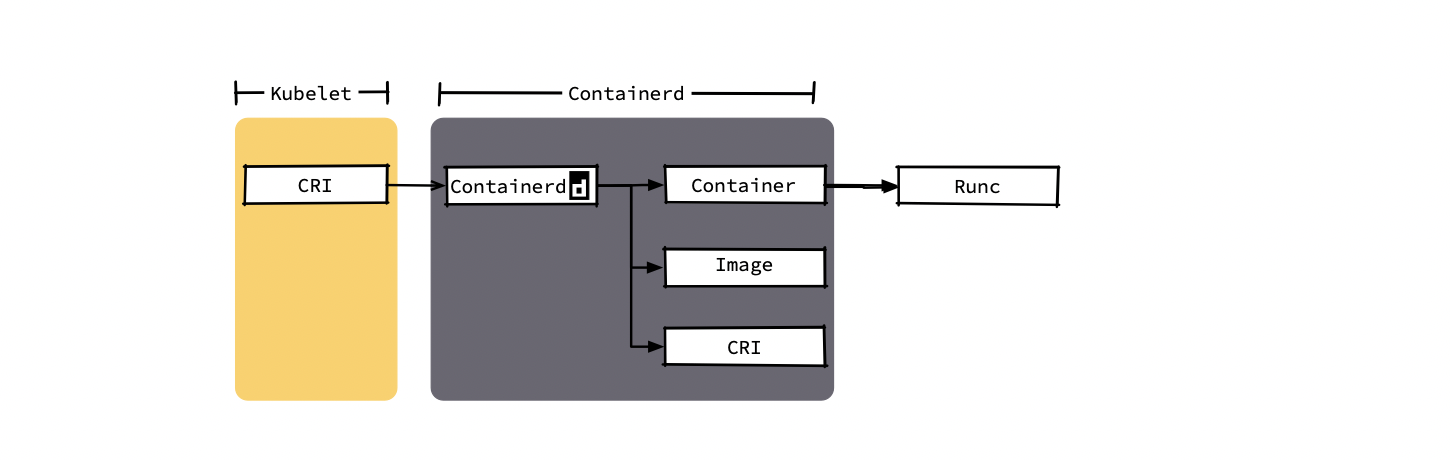
所以,若改用containerd替代docker,则kubelet创建容器的调用链如红色所示。可以直接通过一次grpc调用containerd。
通过上面可知k8s要删除docker是可以理解的一部分了。
其实这是谁胳膊粗的问题,若docker的用户多,且大家都使用,估计也不会剔除它
2. 迁移kubelet容器运行时 2.1 关闭节点服务 关闭相关服务
1
2
3
4
5
systemctl stop kubelet systemctl stop docker systemctl stop containerd
由于新版本中的docker在安装时默认使用containerd做为后端容器运行时,故不需要再安装containerd
2.2 修改containerd的plugin containerd中默认已经实现了cri,但是以plugin的形式。在默认安装的过程中,这个plugin一般是disable状态,需要将其开启
1 2 3 4 5 6 7 8 9 10 11 12 13 version = 2 [plugins."io.containerd.grpc.v1.cri" ] sandbox_image = "registry.cn-qingdao.aliyuncs.com/huaqiangk8s/pause:3.2" [plugins."io.containerd.grpc.v1.cri" .containerd] default_runtime_name = "runc" [plugins."io.containerd.grpc.v1.cri" .containerd.runtimes.runc] runtime_type = "io.containerd.runc.v2" [plugins."io.containerd.grpc.v1.cri" .containerd.runtimes.runc.options] SystemdCgroup = true
一般默认cni和stream配置即可满足kubelet运行使用crictl info查看,但是某些自定义的k8s安装需要配置
1
2
3
[plugins.cri.cni] bin_dir = "/opt/cni/bin" conf_dir = "/etc/cni/net.d"
stream是kubectl exec/log等命令建立流转发通道
1
2
3
4
[plugins.cri] stream_server_address = "127.0.0.1" stream_server_port = "0" enable_tls_streaming = false
1 systemctl start containerd
2.2 安装配置crictl客户端工具 下载工具
1
2
3
wget https://github.com/kubernetes-sigs/cri-tools/releases/download/v1.19.0/crictl-v1.19.0-linux-amd64.tar.gz tar -xzvf crictl-v1.19.0-linux-amd64.tar.gz mv crictl /usr/local /bin/
配置/etc/crictl.yaml
1
2
3
4
5
root@node6 lib] runtime-endpoint: unix:///var/run/containerd/containerd.sock image-endpoint: unix:///var/run/containerd/containerd.sock timeout: 10 debug: true
测试使用
1
2
3
4
[root@node6 lib] DEBU[0000] get runtime connection DEBU[0000] connect using endpoint 'unix:///var/run/containerd/containerd.sock' with '10s' timeout POD ID CREATED STATE NAME NAMESPACE ATTEMPT RUNTIME
2.3 修改kubelet启动参数 查看kubelet启动方式,添加启动参数
1
2
--container-runtime=remote --container-runtime-endpoint=unix:///var/run/containerd/containerd.sock
重启kubelet
1 systemctl restart kubelet
查看相关节点的CONTAINER-RUNTIME是否已经修改
1
2
3
4
5
6
7
8
[root@node1 ~]# kubectl get no -o wide NAME STATUS ROLES AGE VERSION INTERNAL-IP EXTERNAL-IP OS-IMAGE KERNEL-VERSION CONTAINER-RUNTIME node1 Ready master 61d v1.18.9 3.1.20.120 <none> CentOS Linux 7 (Core) 5.9.1-1.el7.elrepo.x86_64 docker://19.3.13 node2 Ready master 61d v1.18.9 3.1.20.121 <none> CentOS Linux 7 (Core) 5.9.1-1.el7.elrepo.x86_64 containerd://1.3.7 node3 Ready master 61d v1.18.9 3.1.20.122 <none> CentOS Linux 7 (Core) 5.9.1-1.el7.elrepo.x86_64 docker://19.3.13 node4 Ready <none> 61d v1.18.9 3.1.20.123 <none> CentOS Linux 7 (Core) 5.9.1-1.el7.elrepo.x86_64 docker://19.3.13 node5 Ready <none> 61d v1.18.9 3.1.20.124 <none> CentOS Linux 7 (Core) 5.9.1-1.el7.elrepo.x86_64 docker://19.3.13 node6 Ready <none> 61d v1.18.9 3.1.20.125 <none> CentOS Linux 7 (Core) 3.10.0-1160.6.1.el7.x86_64 containerd://1.4.3
kubelet使用docker和containerd不同的架构图